8.0 KiB
 deepseek-cursor-proxy
A compatibility proxy that connects Cursor to DeepSeek thinking models (deepseek-v4-pro and deepseek-v4-flash) by properly handling the reasoning_content field for DeepSeek tool-call reasoning API requests.
This proxy can also help other applications and coding agents beyond Cursor that run into the same missing reasoning_content issue with DeepSeek's thinking-mode API. Just point their API base URL at the proxy.
What It Does
- ✅ Injects
reasoning_contentinto outgoing tool-call requests since Cursor does not include the field, restoring previously cached reasoning from regular and streamed DeepSeek responses. See DeepSeek docs for more details. - ✅ Mirrors streamed
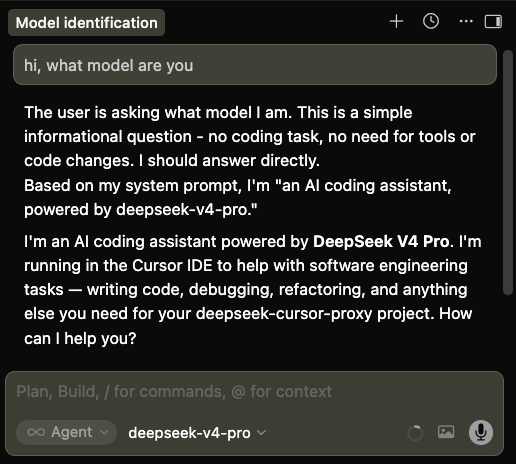
reasoning_contentinto Cursor-visible<think>...</think>text so that thinking tokens are shown in Cursor UI. For BYOK (bring your own key) mode, Cursor renders this as normal text, not as a native collapsible thinking block. - ✅ Starts an ngrok tunnel so Cursor can reach the local proxy through a public HTTPS URL.
- ✅ Provides other compatibility fixes to make DeepSeek models run well in Cursor.
Why This Exists
This repository fixes the following Cursor + DeepSeek tool-call error with thinking mode enabled:
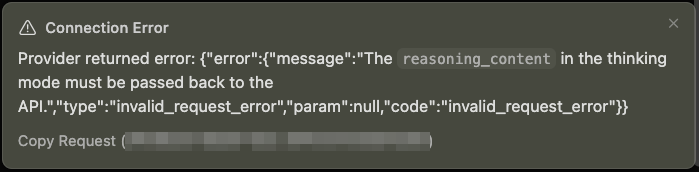
⚠️ Connection Error
Provider returned error:
{
  "error": {
    "message": "The reasoning_content in the thinking mode must be passed back to the API.",
    "type": "invalid_request_error",
    "param": null,
    "code": "invalid_request_error"
  }
}
Usage
Step 1: Set Up ngrok
Cursor blocks non-public API URLs such as localhost, so the proxy needs a public HTTPS URL. ngrok can expose the local proxy to Cursor without opening router ports. Alternatively, you may use Cloudflare Tunnel.
If you're using this proxy with another application that allows localhost API endpoints, you can skip this step entirely by setting ngrok: false in ~/.deepseek-cursor-proxy/config.yaml, or by starting the proxy with --no-ngrok.
Create an ngrok account, then visit ngrok's dashboard: https://dashboard.ngrok.com
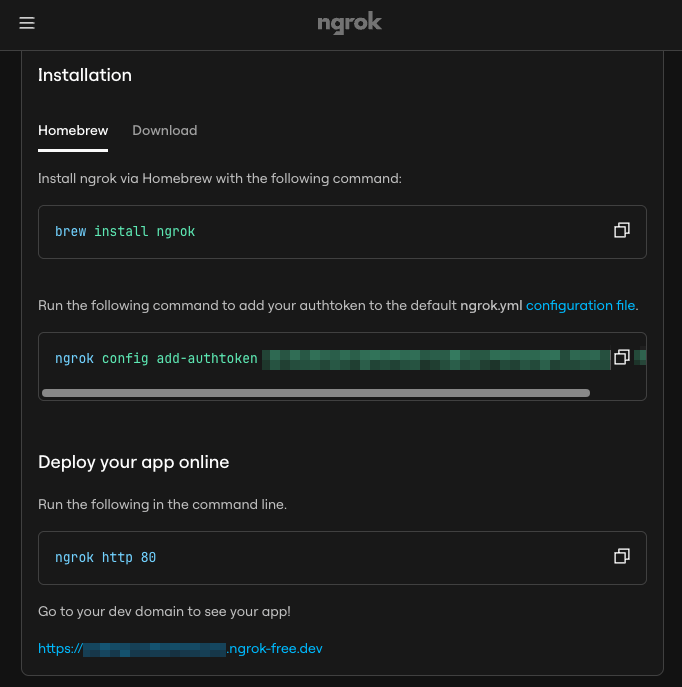
Then, install and authenticate ngrok once:
brew install ngrok
ngrok config add-authtoken <your-ngrok-token>
Step 2: Add Cursor Custom Model
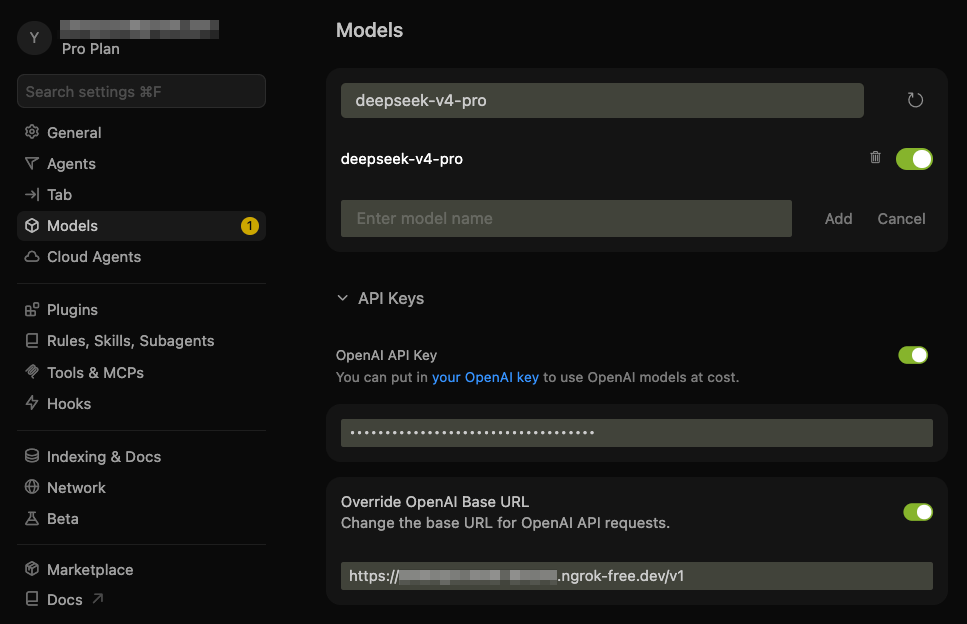
In Cursor, add the DeepSeek custom model and point it at this proxy:
- Model:
deepseek-v4-pro - API Key: your DeepSeek API key
- Base URL: your ngrok HTTPS URL with the
/v1API version path
The proxy respects the DeepSeek model name Cursor sends, such as deepseek-v4-pro or deepseek-v4-flash. The model field in config.yaml is used as a fallback only when a request does not include a model.
For example, if ngrok dashboard shows https://example.ngrok-free.app, use:
https://example.ngrok-free.app/v1
Note: you can toggle the custom API on and off with:
- macOS:
Cmd+Shift+0 - Windows/Linux:
Ctrl+Shift+0
Step 3: Install and Start the Proxy Server
Run with UV
# Install uv if you don't have it
curl -LsSf https://astral.sh/uv/install.sh | sh

# Install and start
# uv installs the program in .venv/ under the repo local folder
git clone https://github.com/yxlao/deepseek-cursor-proxy.git
cd deepseek-cursor-proxy
uv run deepseek-cursor-proxy
Run with Conda
# Install conda if you don't have it
# Follow: https://www.anaconda.com/docs/getting-started/miniconda/install/overview

# Install
conda create -n dcp python=3.10 -y
conda activate dcp
git clone https://github.com/yxlao/deepseek-cursor-proxy.git
cd deepseek-cursor-proxy
pip install -e .

# Start
deepseek-cursor-proxy
When ngrok is enabled, deepseek-cursor-proxy will print the ngrok public URL on start. If it differs from the one in Cursor, update it in Cursor's Base URL field.
On the first run, deepseek-cursor-proxy will create:
~/.deepseek-cursor-proxy/config.yaml: the configuration file~/.deepseek-cursor-proxy/reasoning_content.sqlite3: the reasoning content cache
Persistent settings live in ~/.deepseek-cursor-proxy/config.yaml. Command-line flags override the config for a single run, for example --no-ngrok, --port 9000, or --verbose.
Step 4: Chat with DeepSeek in Cursor
Select deepseek-v4-pro in Cursor and use chat or agent mode as usual.
How It Works
DeepSeek's thinking mode requires reasoning_content from assistant messages in tool-call sequences to be passed back in later requests. Cursor may omit this field, causing DeepSeek to return a 400 error. This proxy sits between Cursor and DeepSeek (Cursor → ngrok → proxy → DeepSeek API) and repairs requests when it has the exact original reasoning cached.
- Core fix: every DeepSeek response, streaming or non-streaming, has its
reasoning_contentstored in a local SQLite cache keyed by message signature, tool-call ID, and tool-call function signature. On outgoing thinking-mode requests, the proxy restores missingreasoning_contentfor tool-call-related assistant messages and sends the complete history to DeepSeek. If the cache is cold, such as after a proxy restart or model switch, the default recovery mode omits older unrecoverable tool-call history, continues from the latest user request, logs the recovery, and prefixes the next Cursor response with a small notice. - Multi-conversation isolation: cache keys are scoped by a SHA-256 hash of the canonical conversation prefix (roles, content, tool calls, excluding
reasoning_content) plus the upstream model/configuration and an API-key hash. Concurrent or interleaved threads with different histories get different scopes, so reused tool-call IDs do not collide. Byte-identical cloned histories are indistinguishable unless Cursor sends a differentiating history. - DeepSeek context caching compatibility: the proxy does not inject synthetic thread IDs, timestamps, or cache-control messages into the prompt. When it restores cached reasoning, it restores the exact original string, preserving repeated prefixes for DeepSeek's automatic best-effort context cache.
- Additional compatibility fixes: the proxy converts legacy
functions/function_callfields totools/tool_choice, preserves required and named tool-choice semantics, normalizesreasoning_effortaliases per DeepSeek docs, strips mirrored<think>blocks from assistant content, converts multi-part content arrays to plain text, logs DeepSeek prompt-cache usage when available, and mirrorsreasoning_contentinto Cursor-visible<think>...</think>blocks for thinking display.
Development
Run unit tests:
uv run python -m unittest discover -s tests
Run pre-commit hooks (code formatting and linting):
uv sync --dev
uv run pre-commit run --all-files
Debugging
Normal logs avoid request/response bodies but still print compact request and usage statistics. rounds is the number of user turns in the forwarded history, reasoning is the number and character size of reasoning_content fields sent to DeepSeek, and cache=hit/miss comes from DeepSeek's usage.prompt_cache_hit_tokens / prompt_cache_miss_tokens.
Run with verbose output:
deepseek-cursor-proxy --verbose
Run without ngrok for local curl testing:
deepseek-cursor-proxy --no-ngrok --port 9000 --verbose
Use another config file:
deepseek-cursor-proxy --config ./dev.config.yaml
Clear the local reasoning cache:
deepseek-cursor-proxy --clear-reasoning-cache