7.1 KiB
 deepseek-cursor-proxy
A compatibility proxy that connects Cursor to DeepSeek thinking models (deepseek-v4-pro and deepseek-v4-flash) by properly handling the reasoning_content field for DeepSeek tool-call reasoning API requests.
What It Does
- ✅ Injects
reasoning_contentinto outgoing tool-call requests since Cursor does not include the field, restoring previously cached reasoning from regular and streamed DeepSeek responses. See DeepSeek docs for more details. - ✅ Mirrors streamed
reasoning_contentinto Cursor-visible<think>...</think>text so that thinking tokens are shown in Cursor's UI. For BYOK/proxy mode, Cursor renders this as normal text, not as a native collapsible thinking block. - ✅ Starts an ngrok tunnel so Cursor can reach the local proxy through a public HTTPS URL.
- ✅ Provides other compatibility fixes to make DeepSeek models run well in Cursor.
Why This Exists
This repository fixes the following Cursor + DeepSeek tool-call error with thinking mode enabled:
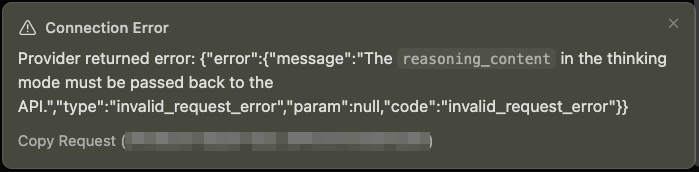
⚠️ Connection Error
Provider returned error:
{
  "error": {
    "message": "The reasoning_content in the thinking mode must be passed back to the API.",
    "type": "invalid_request_error",
    "param": null,
    "code": "invalid_request_error"
  }
}
Usage
Step 1: Set Up ngrok
Cursor blocks non-public API URLs such as localhost, so the proxy needs a public HTTPS URL. ngrok can expose the local proxy to Cursor without opening router ports. Alternatively, you may use Cloudflare Tunnel.
Create an ngrok account, then visit ngrok's dashboard: https://dashboard.ngrok.com
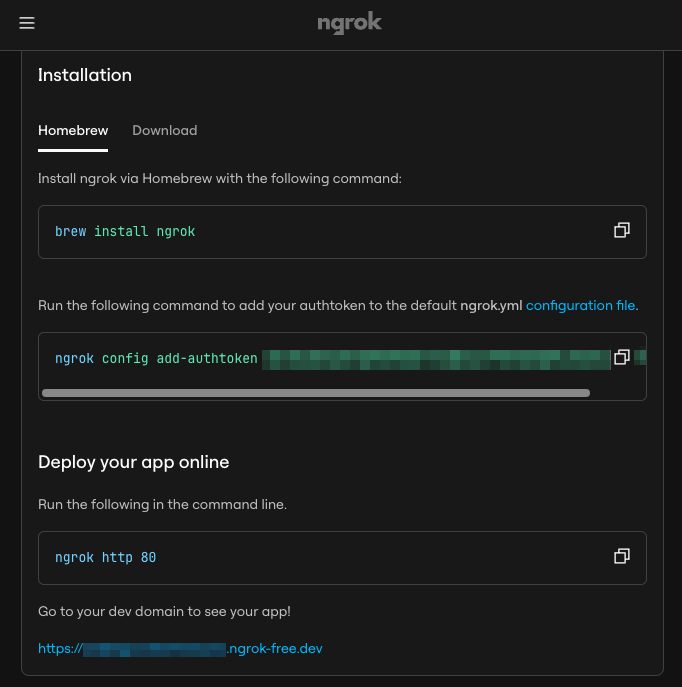
Then, install and authenticate ngrok once:
brew install ngrok
ngrok config add-authtoken <your-ngrok-token>
Step 2: Add Cursor Custom Model
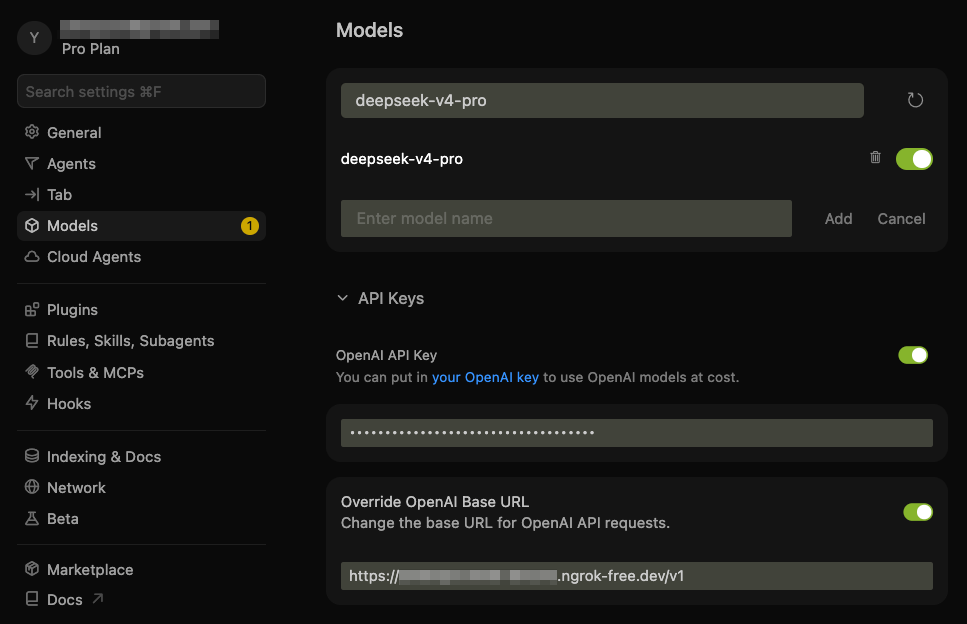
In Cursor, add the DeepSeek custom model and point it at this proxy:
- Model:
deepseek-v4-pro - API Key: your DeepSeek API key
- Base URL: your ngrok HTTPS URL with the
/v1API version path
The proxy respects the DeepSeek model name Cursor sends, such as deepseek-v4-pro or deepseek-v4-flash. The model field in config.yaml is used as a fallback only when a request does not include a model.
For example, if ngrok dashboard shows https://example.ngrok-free.app, use:
https://example.ngrok-free.app/v1
Note: you can toggle the custom API on and off with:
- macOS:
Cmd+Shift+0 - Windows/Linux:
Ctrl+Shift+0
Step 3: Install and Start the Proxy Server
Run with UV
# Install uv if you don't have it
curl -LsSf https://astral.sh/uv/install.sh | sh

# Install and start
# uv installs the program in .venv/ under the repo local folder
git clone https://github.com/yxlao/deepseek-cursor-proxy.git
cd deepseek-cursor-proxy
uv run deepseek-cursor-proxy
Run with Conda
# Install conda if you don't have it
# Follow: https://www.anaconda.com/docs/getting-started/miniconda/install/overview

# Install
conda create -n dcp python=3.10 -y
conda activate dcp
git clone https://github.com/yxlao/deepseek-cursor-proxy.git
cd deepseek-cursor-proxy
pip install -e .

# Start
deepseek-cursor-proxy
On start, deepseek-cursor-proxy will print the ngrok public URL. If it differs from the one in Cursor, update it in Cursor's Base URL field.
On the first run, deepseek-cursor-proxy will create:
~/.deepseek-cursor-proxy/config.yaml: the configuration file~/.deepseek-cursor-proxy/reasoning_content.sqlite3: the reasoning content cache
Step 4: Chat with DeepSeek in Cursor
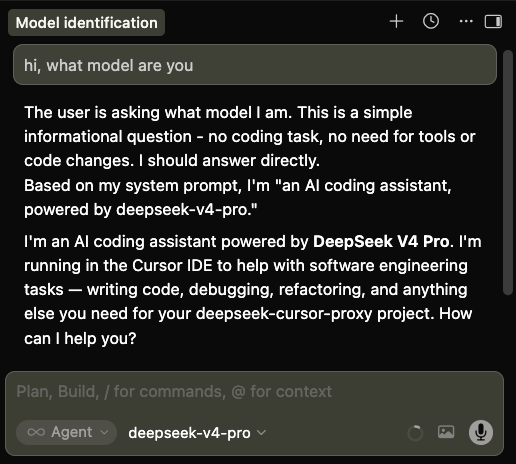
Select deepseek-v4-pro in Cursor and use chat or agent mode as usual.
How It Works
DeepSeek's thinking mode requires reasoning_content from assistant messages in tool-call sequences to be passed back in later requests. Cursor may omit this field, causing DeepSeek to return a 400 error. This proxy sits between Cursor and DeepSeek (Cursor → ngrok → proxy → DeepSeek API) and repairs requests when it has the exact original reasoning cached.
- Core fix: every DeepSeek response, streaming or non-streaming, has its
reasoning_contentstored in a local SQLite cache keyed by message signature, tool-call ID, and tool-call function signature. On outgoing thinking-mode requests, the proxy restores missingreasoning_contentfor tool-call-related assistant messages and sends the complete history to DeepSeek. If the cache is cold, such as after a proxy restart or model switch, the default recovery mode omits older unrecoverable tool-call history, continues from the latest user request, logs the recovery, and prefixes the next Cursor response with a small notice. - Multi-conversation isolation: cache keys are scoped by a SHA-256 hash of the canonical conversation prefix (roles, content, tool calls, excluding
reasoning_content) plus the upstream model/configuration and an API-key hash. Concurrent or interleaved threads with different histories get different scopes, so reused tool-call IDs do not collide. Byte-identical cloned histories are indistinguishable unless Cursor sends a differentiating history. - DeepSeek prefix caching compatibility: the proxy does not inject synthetic thread IDs, timestamps, or cache-control messages into the prompt. When it restores cached reasoning, it restores the exact original string, preserving repeated prefixes for DeepSeek's automatic best-effort context cache.
- Additional compatibility fixes: the proxy converts legacy
functions/function_callfields totools/tool_choice, preserves required and named tool-choice semantics, normalizesreasoning_effortaliases per DeepSeek docs, strips mirrored<think>blocks from assistant content, converts multi-part content arrays to plain text, logs DeepSeek prompt-cache usage when available, and mirrorsreasoning_contentinto Cursor-visible<think>...</think>blocks for thinking display.
Debugging
Normal logs avoid request/response bodies but still print compact request and usage statistics. rounds is the number of user turns in the forwarded history, reasoning is the number and character size of reasoning_content fields sent to DeepSeek, and cache=hit/miss comes from DeepSeek's usage.prompt_cache_hit_tokens / prompt_cache_miss_tokens.
Run with verbose output:
deepseek-cursor-proxy --verbose
Run without ngrok for local curl testing:
PROXY_NGROK=false deepseek-cursor-proxy --port 9000 --verbose
Use another config file:
deepseek-cursor-proxy --config ./dev.config.yaml
Clear the local reasoning cache:
deepseek-cursor-proxy --clear-reasoning-cache
Run tests:
PYTHONPATH=src python -m unittest discover -s tests