 c238a40045
|
||
|---|---|---|
| .cursor/rules | ||
| assets | ||
| src/deepseek_cursor_proxy | ||
| tests | ||
| .gitignore | ||
| .pre-commit-config.yaml | ||
| LICENSE | ||
| README.md | ||
| config.example.yaml | ||
| pyproject.toml | ||
README.md
deepseek-cursor-proxy
Compatibility proxy connecting Cursor to DeepSeek thinking models (deepseek-v4-pro and deepseek-v4-flash).
What It Does
- ✅ Caches DeepSeek
reasoning_contentfrom regular and streamed responses, then restores it on later tool-call turns when Cursor omits it. See DeepSeek docs for more details. - ✅ Mirrors streamed
reasoning_contentinto Cursor-visible<think>...</think>text so that thinking tokens are shown in Cursor's UI. For BYOK/proxy mode, Cursor renders this as normal text, not as a native collapsible thinking block. - ✅ Starts an ngrok tunnel so Cursor can reach the local proxy.
- ✅ Provides other compatibility fixes to make DeepSeek models run well in Cursor.
Why This Exists
This repository fixes the following Cursor + DeepSeek tool-call error with thinking mode enabled:

⚠️ Connection Error
Provider returned error:
{
  "error": {
    "message": "The reasoning_content in the thinking mode must be passed back to the API.",
    "type": "invalid_request_error",
    "param": null,
    "code": "invalid_request_error"
  }
}
Usage
Step 1: Set Up ngrok
Create an ngrok account, visit ngrok's Dashboard: https://dashboard.ngrok.com
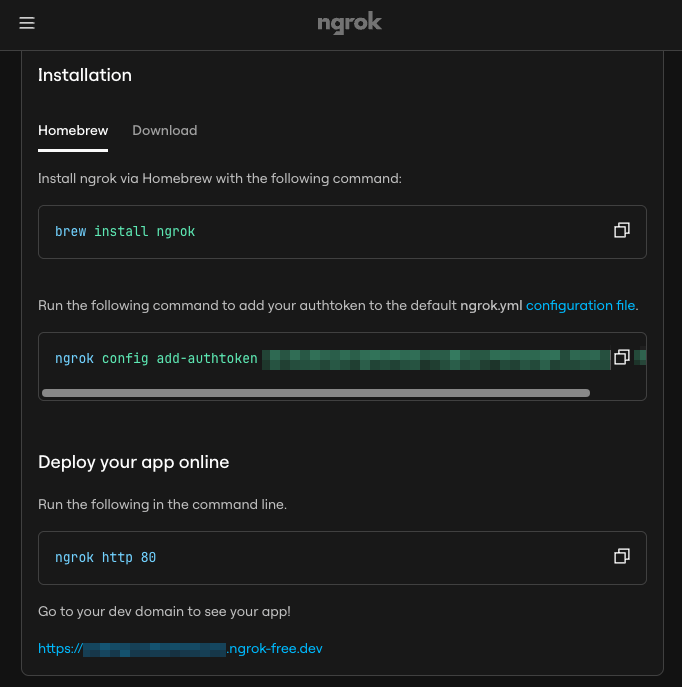
Then, install and authenticate ngrok once:
brew install ngrok
ngrok config add-authtoken <your-ngrok-token>
Step 2: Add Cursor Custom Model
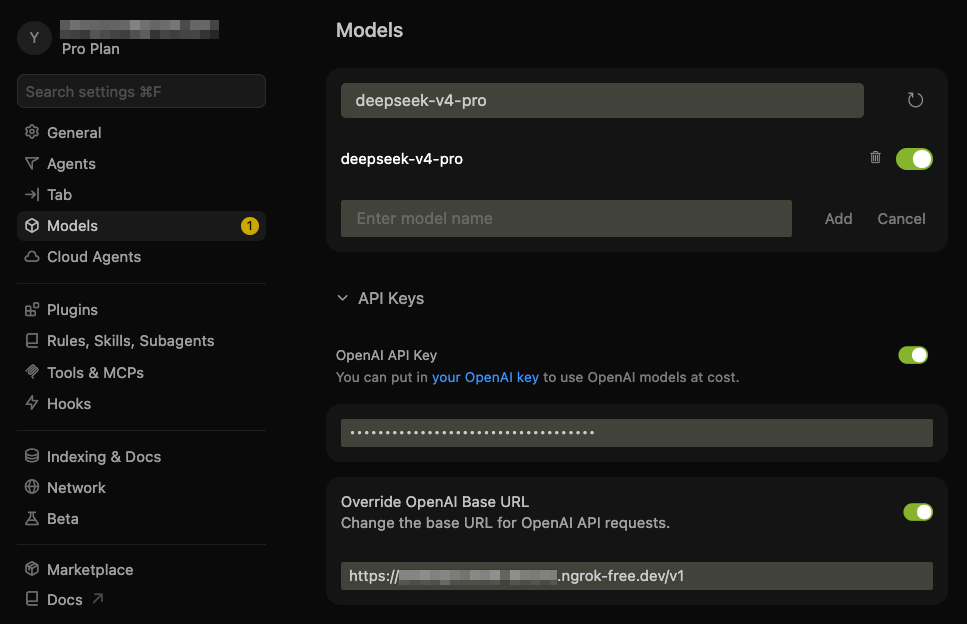
In Cursor, add the DeepSeek custom model and point it at this proxy:
- Model:
deepseek-v4-pro - API Key: your DeepSeek API key
- Base URL: your ngrok HTTPS URL with the
/v1API version path
For example, if ngrok dashboard shows https://example.ngrok-free.app, use:
https://example.ngrok-free.app/v1
Note: you can toggle the custom API on and off with:
- macOS:
Cmd+Shift+0 - Windows/Linux:
Ctrl+Shift+0
Step 3: Start the Proxy Server
Install and run the proxy:
conda create -n dcp python=3.10 -y
conda activate dcp
pip install -e .
deepseek-cursor-proxy --verbose
The proxy creates ~/.deepseek-cursor-proxy/config.yaml on first run.
This will also print the ngrok public URL. If it differs from the one in Cursor, update it in Cursor's Base URL field.
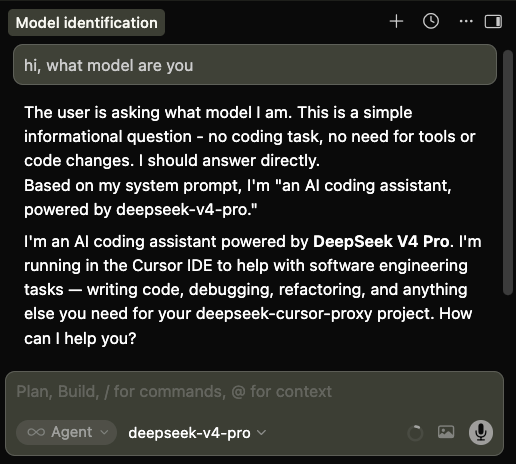
Step 4: Chat with DeepSeek in Cursor
Select deepseek-v4-pro in Cursor and use chat or agent mode as usual.
Debugging and Development
Run without ngrok for local curl testing:
PROXY_NGROK=false deepseek-cursor-proxy --port 9000 --verbose
Use another config file:
deepseek-cursor-proxy --config ./dev.config.yaml
Run tests:
PYTHONPATH=src python -m unittest discover -s tests