
DeepSeek Cursor Proxy
 ```txt
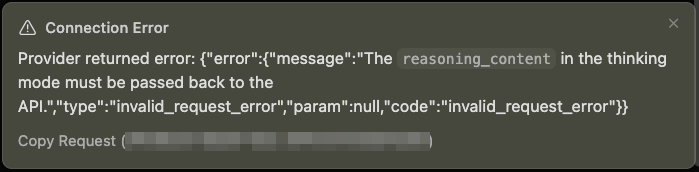
⚠️ Connection Error
Provider returned error:
{
"error": {
"message": "The reasoning_content in the thinking mode must be passed back to the API.",
"type": "invalid_request_error",
"param": null,
"code": "invalid_request_error"
}
}
```
## Usage
### Step 1: Set Up ngrok
Cursor blocks non-public API URLs such as `localhost`, so the proxy needs a public HTTPS URL. [ngrok](https://ngrok.com/) can expose the local proxy to Cursor without opening router ports. Alternatively, you may use [Cloudflare Tunnel](https://developers.cloudflare.com/tunnel/setup/). Create an ngrok account and visit [ngrok's dashboard](https://dashboard.ngrok.com). You will find the authtoken and public URL there.
If you're using this proxy with another application that allows localhost API endpoints, you can skip this step entirely by setting `ngrok: false` in `~/.deepseek-cursor-proxy/config.yaml`, or by starting the proxy with `--no-ngrok`.
```txt
⚠️ Connection Error
Provider returned error:
{
"error": {
"message": "The reasoning_content in the thinking mode must be passed back to the API.",
"type": "invalid_request_error",
"param": null,
"code": "invalid_request_error"
}
}
```
## Usage
### Step 1: Set Up ngrok
Cursor blocks non-public API URLs such as `localhost`, so the proxy needs a public HTTPS URL. [ngrok](https://ngrok.com/) can expose the local proxy to Cursor without opening router ports. Alternatively, you may use [Cloudflare Tunnel](https://developers.cloudflare.com/tunnel/setup/). Create an ngrok account and visit [ngrok's dashboard](https://dashboard.ngrok.com). You will find the authtoken and public URL there.
If you're using this proxy with another application that allows localhost API endpoints, you can skip this step entirely by setting `ngrok: false` in `~/.deepseek-cursor-proxy/config.yaml`, or by starting the proxy with `--no-ngrok`.
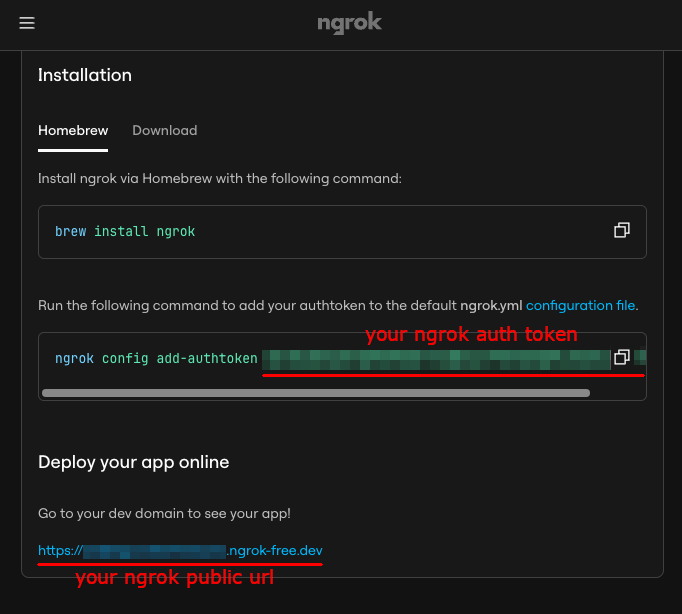 Then, install and authenticate ngrok once:
```bash
brew install ngrok
ngrok config add-authtoken
Then, install and authenticate ngrok once:
```bash
brew install ngrok
ngrok config add-authtoken 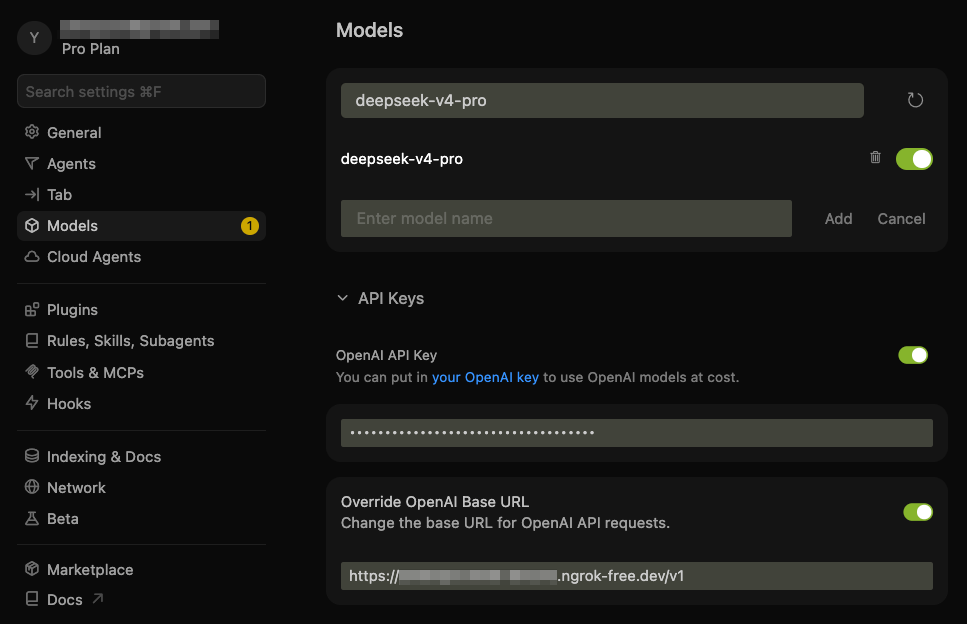 Note: you can toggle the custom API on and off with:
- macOS: `Cmd+Shift+0`
- Windows/Linux: `Ctrl+Shift+0`
### Step 4: Chat with DeepSeek in Cursor
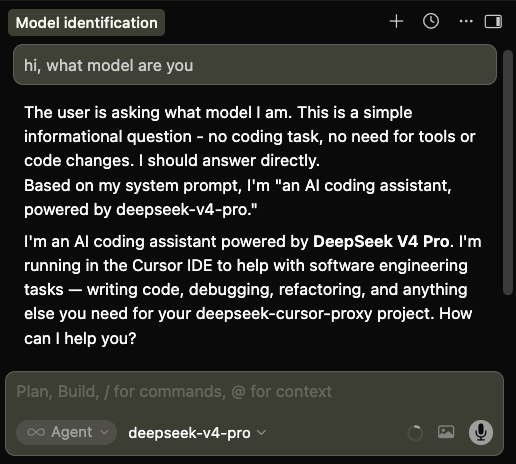
Select `deepseek-v4-pro` in Cursor and use chat or agent mode as usual.
Note: you can toggle the custom API on and off with:
- macOS: `Cmd+Shift+0`
- Windows/Linux: `Ctrl+Shift+0`
### Step 4: Chat with DeepSeek in Cursor
Select `deepseek-v4-pro` in Cursor and use chat or agent mode as usual.
 ## How It Works
- **Core fix:** DeepSeek [thinking-mode tool calls](https://api-docs.deepseek.com/guides/thinking_mode#tool-calls) require the complete **multi-round** `reasoning_content` chain to be sent back in later requests. Cursor omits that field, causing a 400 error. The proxy (`Cursor -> ngrok -> proxy -> DeepSeek API`) stores DeepSeek's original `reasoning_content` and patches missing blocks back into outgoing tool-call history.
- **Multi-conversation isolation:** To avoid collisions across concurrent conversations, the proxy scopes cache keys by a SHA-256 hash of the canonical conversation prefix (roles, content, and tool calls, excluding `reasoning_content`) plus the upstream model, configuration, and an API-key hash. Different threads get different scopes, so reused tool-call IDs do not collide. Byte-identical cloned histories produce identical scopes.
- **Context caching compatibility:** The proxy preserves compatibility by never injecting synthetic thread IDs, timestamps, or cache-control messages. It restores `reasoning_content` as the exact original string, so repeated prefixes remain intact for [DeepSeek context cache](https://api-docs.deepseek.com/guides/kv_cache). Cache hit rates are logged in the terminal output.
- **Additional compatibility fixes:** Beyond reasoning repair, the proxy converts legacy `functions`/`function_call` fields to `tools`/`tool_choice`, preserves required and named tool-choice semantics, normalizes `reasoning_effort` aliases, strips mirrored thinking display blocks from assistant content, flattens multi-part content arrays to plain text, and mirrors `reasoning_content` into Cursor-visible Markdown details blocks.
## Development
Run unit tests:
```bash
uv run python -m unittest discover -s tests
```
Run pre-commit hooks (code formatting and linting):
```bash
uv sync --dev
uv run pre-commit run --all-files
```
## Debugging
Run with verbose output:
```bash
deepseek-cursor-proxy --verbose
```
Run without ngrok for local curl testing:
```bash
deepseek-cursor-proxy --no-ngrok --port 9000 --verbose
```
Capture full structured request traces for debugging:
```bash
deepseek-cursor-proxy --verbose --trace-dir ./trace-dumps
```
Use another config file:
```bash
deepseek-cursor-proxy --config ./dev.config.yaml
```
Clear the local reasoning cache:
```bash
deepseek-cursor-proxy --clear-reasoning-cache
```
## How It Works
- **Core fix:** DeepSeek [thinking-mode tool calls](https://api-docs.deepseek.com/guides/thinking_mode#tool-calls) require the complete **multi-round** `reasoning_content` chain to be sent back in later requests. Cursor omits that field, causing a 400 error. The proxy (`Cursor -> ngrok -> proxy -> DeepSeek API`) stores DeepSeek's original `reasoning_content` and patches missing blocks back into outgoing tool-call history.
- **Multi-conversation isolation:** To avoid collisions across concurrent conversations, the proxy scopes cache keys by a SHA-256 hash of the canonical conversation prefix (roles, content, and tool calls, excluding `reasoning_content`) plus the upstream model, configuration, and an API-key hash. Different threads get different scopes, so reused tool-call IDs do not collide. Byte-identical cloned histories produce identical scopes.
- **Context caching compatibility:** The proxy preserves compatibility by never injecting synthetic thread IDs, timestamps, or cache-control messages. It restores `reasoning_content` as the exact original string, so repeated prefixes remain intact for [DeepSeek context cache](https://api-docs.deepseek.com/guides/kv_cache). Cache hit rates are logged in the terminal output.
- **Additional compatibility fixes:** Beyond reasoning repair, the proxy converts legacy `functions`/`function_call` fields to `tools`/`tool_choice`, preserves required and named tool-choice semantics, normalizes `reasoning_effort` aliases, strips mirrored thinking display blocks from assistant content, flattens multi-part content arrays to plain text, and mirrors `reasoning_content` into Cursor-visible Markdown details blocks.
## Development
Run unit tests:
```bash
uv run python -m unittest discover -s tests
```
Run pre-commit hooks (code formatting and linting):
```bash
uv sync --dev
uv run pre-commit run --all-files
```
## Debugging
Run with verbose output:
```bash
deepseek-cursor-proxy --verbose
```
Run without ngrok for local curl testing:
```bash
deepseek-cursor-proxy --no-ngrok --port 9000 --verbose
```
Capture full structured request traces for debugging:
```bash
deepseek-cursor-proxy --verbose --trace-dir ./trace-dumps
```
Use another config file:
```bash
deepseek-cursor-proxy --config ./dev.config.yaml
```
Clear the local reasoning cache:
```bash
deepseek-cursor-proxy --clear-reasoning-cache
```