# deepseek-cursor-proxy
A simple proxy that caches and restores DeepSeek `reasoning_content` across tool-call turns in Cursor, making thinking models like `deepseek-v4-pro` and `deepseek-v4-flash` work correctly.
## What It Does
- Caches DeepSeek `reasoning_content` from regular and streamed responses, then restores it on later tool-call turns when Cursor omits it.
- Mirrors streamed `reasoning_content` into Cursor-visible `...` text so thinking tokens are shown in Cursor BYOK/proxy chats. Cursor currently renders this as normal chat text, not as a native collapsible Thinking block.
- Provides other compatibility fixes for running Cursor with the DeepSeek official API.
## Why This Exists
DeepSeek thinking mode returns `reasoning_content` separately from final `content`. After an assistant turn with tool calls, DeepSeek requires that same `reasoning_content` to be sent back in later requests. Cursor can omit it in custom OpenAI-compatible flows, causing `The reasoning_content in the thinking mode must be passed back to the API.` This proxy caches reasoning by conversation prefix, message signature, and tool-call IDs, then restores it before forwarding to DeepSeek.
For streamed responses, the proxy also mirrors DeepSeek `reasoning_content` into Cursor-visible `...` content while leaving the original `reasoning_content` field intact. This lets Cursor display the thinking text in OpenAI-compatible BYOK/proxy flows, and the proxy strips those display-only tags from later assistant history before replaying it to DeepSeek.
This repo fixes the following error:
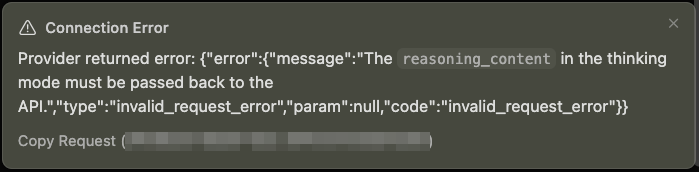
```txt
⚠️ Connection Error
Provider returned error: {"error":{"message":"The reasoning_content in the thinking mode must be passed back to the
API.","type":"invalid_request_error","param":null,"code":"invalid_request_error"}}
```
## 1. Install
```bash
source ~/miniconda3/etc/profile.d/conda.sh
conda activate pytools
PIP_REQUIRE_VIRTUALENV=false python -m pip install -e .
```
## 2. Configure
```bash
mkdir -p ~/.deepseek-cursor-proxy
chmod 700 ~/.deepseek-cursor-proxy
cp .env.example ~/.deepseek-cursor-proxy/.env
chmod 600 ~/.deepseek-cursor-proxy/.env
```
`.env.example` is only a safe template. The proxy loads `~/.deepseek-cursor-proxy/.env` automatically, and that file should stay outside this repository because it contains your keys.
Edit `~/.deepseek-cursor-proxy/.env`:
```bash
DEEPSEEK_API_KEY=sk-your-deepseek-key
PROXY_API_KEY=cursor-local-token
CURSOR_DISPLAY_REASONING=true
```
Keep `PROXY_API_KEY` set when using ngrok because the proxy will be reachable from the public internet.
By default, reasoning cache data is stored at:
```text
~/.deepseek-cursor-proxy/reasoning_content.sqlite3
```
Override it with `REASONING_CONTENT_PATH` or `deepseek-cursor-proxy --reasoning-content-path ` only when you need a custom location.
## 3. Set Up Ngrok Once
- Create/login to an ngrok account: https://dashboard.ngrok.com/signup
- Copy your authtoken from the dashboard: https://dashboard.ngrok.com/get-started/your-authtoken
```bash
brew install ngrok
ngrok config add-authtoken
```
## 4. Run
```bash
deepseek-cursor-proxy --verbose
```
The proxy prints a line like:
```text
Cursor Base URL: https://example.ngrok-free.app/v1
```
Use that URL in Cursor. If you do not use ngrok and point Cursor at `localhost` or `127.0.0.1`, Cursor may fail with `ssrf_blocked: connection to private IP is blocked`.
## 5. Cursor Settings
- OpenAI Base URL: the printed ngrok URL ending in `/v1`
- OpenAI API Key: the value of `PROXY_API_KEY`
- Model: `deepseek-v4-pro`
## Useful Commands
Run without ngrok for local curl testing:
```bash
PROXY_NGROK=false deepseek-cursor-proxy --port 9000 --verbose
```
Disable the Cursor display mirror if you only want raw OpenAI-compatible response fields:
```bash
CURSOR_DISPLAY_REASONING=false deepseek-cursor-proxy --verbose
```
Log full request bodies only when needed:
```bash
deepseek-cursor-proxy --ngrok --verbose --log-bodies
```
This prints the Cursor request body, the normalized DeepSeek request body, DeepSeek error bodies, and the final streamed assistant message.
Use a different env file for development:
```bash
deepseek-cursor-proxy --config ./dev.env
```
Run tests:
```bash
PYTHONPATH=src python -m unittest discover -s tests
```
## Development
Pre-commit runs whitespace checks, Black, and Ruff:
```bash
PIP_REQUIRE_VIRTUALENV=false python -m pip install -e ".[dev]"
pre-commit install
pre-commit run --all-files
```
## Notes
- Distribution name: `deepseek-cursor-proxy`
- Import package: `deepseek_cursor_proxy`
- User config file: `~/.deepseek-cursor-proxy/.env`
- Cache file: `~/.deepseek-cursor-proxy/reasoning_content.sqlite3`
- DeepSeek thinking docs: https://api-docs.deepseek.com/guides/thinking_mode
- DeepSeek chat completion docs: https://api-docs.deepseek.com/api/create-chat-completion
- Cursor forum report: https://forum.cursor.com/t/compatibility-with-deepseek-models-design-to-return-reasoning-content-after-tool-calls/158905
- ngrok setup docs: https://ngrok.com/downloads